Your whole interior studio, in one place.
Enquiries, GST quotes and invoices, POs, vendors and your team’s tasks, for interior designers and architects in India.
- 30-day free trial
- No card needed
- GST quotes and invoices
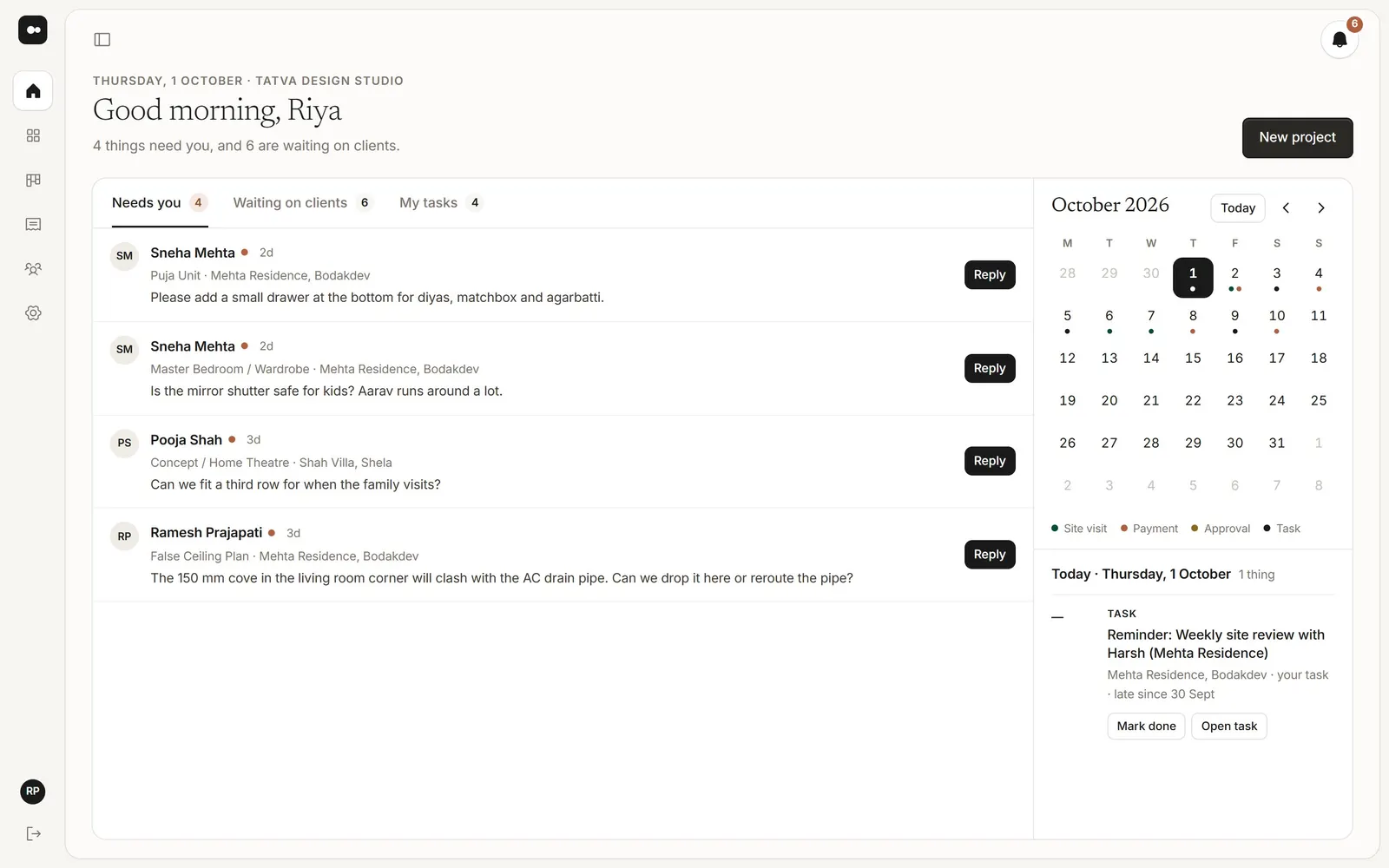
What needs you today, and what clients are waiting on.
Works with what you already use
Google DriveWhatsAppAny emailPDF drawing setsAny phoneClaude and ChatGPTFrom the first call to the final payment.
Six steps every project goes through. Plott keeps all six in one place, so nothing sits in a chat or a spreadsheet.
- 1Enquiries
Follow up every enquiry
Every lead in one list, with its stage and the next follow-up date.
- 2Quotes
Send a GST quote
Add the line items. CGST and SGST are worked out, and your client signs on the phone.
- 3Tasks and team
Give the work to your team
One board for the whole studio. Every task has an owner and a due date.
- 4Designs
Show the design, get a yes
Present it as slides in your office, or send one private link. The approval is on record.
- 5POs and vendors
Order from your vendors
POs to your carpenter or supplier, their bills, and what you still owe them.
- 6Invoices and payments
Bill it and get paid
A tax invoice from the quote. Record each payment as it comes in, cash included.

Everything else your studio needs.
All of it is in your trial from the first day. Use what you need and switch off the rest.
- Home and remindersWhat needs you today. Reminders turn into tasks on the day.
- PresentationsSlides from the project’s photos. Present them or save a PDF.
- PaymentsReceived, due and not invoiced yet, for every project.
- Project costVendor bills against the signed quote. See what’s left for you.
- Vendor listEvery carpenter and supplier, with their POs, bills and dues.
- Documents to signUpload an agreement. Each person signs it on their phone.
- Team rolesOwner, Designer and Accounts. Roles decide who sees money.
- Project templatesStarting tasks and settings for each kind of project.
- Client linkOne private page per project, for the clients who want it.
- Versions and approvalsRev A, Rev B, Rev C. The approved version stays on record.
- Claude and ChatGPTAsk what’s waiting on a project. It drafts, you send.
- ModulesSwitch on only the parts your studio uses.
Same day. Much less chasing.
Five moments every studio knows, before Plott and after.
- 9:30 amMorning
A new enquiry comes in
WhatsAppBeforeHi, saw your work on Instagram. 3BHK in Baner, can we talk?Buried under forty other chats by lunch.
PlottWith PlottKulkarni, 3BHK BanerEnquiry · from InstagramFollow up todayAdd it to Enquiries with the next follow-up date on it.
- 11:00 amLate morning
Send the quote
SpreadsheetBeforeQuote_Shah_final2.xlsxGST 18% · ₹ ?GST worked out by hand, in a format that changes every time.
PlottWith PlottQuote Q/2026/018 · ₹4,72,000Shah Villa · CGST and SGST addedSentAdd the line items. Plott works out the GST and sends it on your letterhead.
- 1:00 pmAfternoon
The client wants a change
WhatsAppBeforeMake the TV wall lighter. And one more thing, will call youYou tell the team on a call, and by evening someone has forgotten.
PlottWith PlottLighten the TV wallMehta Residence · Riya · Due FriTask for RiyaIt becomes a task with an owner and a date, so nobody has to ask twice.
- 4:00 pmSite and vendors
Order for the site
SpreadsheetBeforePO_final_v3 (2).xlsxRaj Carpentry · ₹ ?Typed in a spreadsheet, then a photo of it on WhatsApp.
PlottWith PlottPO to Raj CarpentryMehta Residence · ₹86,400Ready to sendMake the PO from the project, then send it to the vendor.
- 7:00 pmEvening
Getting paid
PhoneBeforeCalling about the second payment. Again.Invoices in one file, payments remembered in your head.
PlottWith PlottTax invoice 031 · ₹1,18,000Made from the approved quoteReminder setSend the invoice, and a reminder turns up on the due date.
7:30 pm. The laptop is closed.
The day’s work is done and written down, and tomorrow is already on the board.
- Every enquiry has a next stepA follow-up date on each lead, so none of them goes cold.
- Your team knows what’s nextEvery change is a task with an owner and a date, so nobody has to ask.
- Everything is on recordEvery quote, PO, invoice and payment sits with its project.
- Quote Q/2026/018 sent to the Shahs11:20 am
- Riya made the TV wall lighter3:15 pm
- PO to Raj Carpentry sent4:20 pm
- Tax invoice 031 sent to Amit6:50 pm
Your designs and your clients stay private.
Your work is encrypted, your files stay in your Drive, and every person sees only what you allow.
Your data travels over HTTPS and is stored encrypted on Cloudflare.
Email passwords and keys you save are encrypted again, never shown back.
Plott only views the folder you share. Nothing in your Drive changes.
Each client sees only their own link. Roles decide who sees money.
Plott never takes or holds your clients’ payments. You only record them.
Start today. Nothing to install.
And no data to move first.
Sign up with your email and your studio’s name. No card needed.
Switch on only the parts your studio needs. Change them any time in Settings.
Or start with a project. Then invite your team, each person with a role.
Ask Claude or ChatGPT what’s waiting on a project.
Connect Plott to Claude, ChatGPT or any app that takes an MCP connector. It reads your projects, tasks, approvals and invoices, and drafts tasks, quotes and POs. You check them and send them.
Priced per studio, not per seat.
Free for 30 days, no credit card. Prices in INR, before 18% GST.
For one designer running their own projects.
- 5 projects
- Just you
- 10 clients per project
- Pins, versions and approvals
- Reminders
A small team sharing one board and one set of clients.
- 25 projects
- 5 team members
- 25 clients per project
- Watermarked previews
- Documents to sign
An established practice: as many projects and people as you need.
- 100 projects
- 20 team members
- 25 clients per project
- Everything in Studio
What studios ask first.
Does Plott make GST invoices?
Yes. Quotes and invoices work out CGST and SGST, or IGST for another state, from your GSTIN and your client’s address. If you aren’t registered for GST, you can leave it out.
Do my clients have to use Plott?
No. Enquiries, quotes, invoices, POs and tasks are for your studio. The client link for designs is one module, and you can switch it off in Settings if your clients prefer WhatsApp or a meeting.
Can I switch off the parts I don’t use?
Yes. Pick your modules when you set up, and change them any time in Settings. Switching one off only hides it. Nothing is deleted.
Can my team work in it too?
Yes. Invite people as Owner, Designer or Accounts. Notes, tasks and reminders are shared across the studio.
Can Plott replace our task spreadsheet?
Yes. Tasks for every project, and for the studio itself, sit on one board with an owner and a due date, as a board or a list. Client notes can be added to a task, and reminders turn into tasks on the day.
Can clients see our tasks and team comments?
No. Tasks, team comments and reminders are only for your studio. Clients see their designs, notes, approvals, documents and invoices on their link.
Do you copy my Google Drive files?
No. You share the folder with Plott as a Viewer. Nothing in your Drive is copied or changed, and your files stay named the way you named them.
Can I show PDFs and floor plans?
Yes. A multi-page PDF opens page by page in the browser, with no download. Sheet numbers and revisions are read from the file name.
Can I use Plott from Claude or ChatGPT?
Yes. Add Plott as a connector in Claude, ChatGPT or another app that takes MCP connectors, and allow it on your studio. It can look up your projects, tasks, approvals and invoices, and draft tasks, quotes and POs. It never sends anything to a client or vendor and never records a payment. Disconnect it in Settings at any time.
What happens to my files if I cancel?
Your files were never ours. They’re in your Drive, named the way you named them. The link stops working; nothing else changes.
More answers in the Help Centre.
Start with your next enquiry.
Add it to Plott today. Everything else is there when you need it.
MIN20Talk to us for 20 minutesPick a time that suits you, in IST